

Why do you need Non-stop load search?
For trucking professionals, staying current with load listings on the load board is crucial. Yet, manually refreshing Amazon Relay's load board is inefficient and frustrating. Amazon's 15-second auto-refresh doesn't alert users to new loads or price changes, so it's easy to miss important updates. Plus, the best loads can vanish in seconds, making a 15-second refresh too slow to catch top opportunities. This led to creating "Non-stop load search" also known as "Board Intelligence", improving on Amazon's system by providing immediate updates and alerts, ensuring you never overlook valuable loads. This article will dive into how "Non-stop load search" works.
🎞 Video tutorial 🎞
If you prefer watching videos, here’s the tutorial from our Youtube channel. But if you want to get the most out of this topic, you should do both: watch the video and read the blog post. Please note: This video may contain outdated information due to recent updates. For the most current features and details, refer to the text version.
⚙️ Main technical aspects ⚙️
The following feature can ONLY be used with "Single notification" and "One-click book" modes. Once you activate "Non-stop load search", the auto booking features will automatically be deactivated. This helps users find desirable loads by updating the load board in real-time, but users must book loads themselves. This feature aims to give users the information they need to quickly and wisely book loads on their own.
Please note that while the features will remain the same, the visual representation may change over time as we continue to improve our service. Don’t be surprised if anything looks different from what is shown here.
Once activated, the feature provides users with additional options to help them refine their search.
These options include:
1️⃣ Price change (min) - This option allows users to set a minimum price change threshold for loads. If a load's price increases by the specified amount, the user will be notified with a sound alert, making it easy to stay on top of price changes. If the price change is smaller than the set amount, there won't be an alert, avoiding unneeded notifications and keeping attention on significant changes. Can be edited while the search is running.

2️⃣ Show changes on top - When activated, it automatically places any new load, price change, or updates to initial pickup times at the top of your search results for easy tracking, ensuring the latest updates always get priority and replace the previous top entry. Can be edited while the search is running.
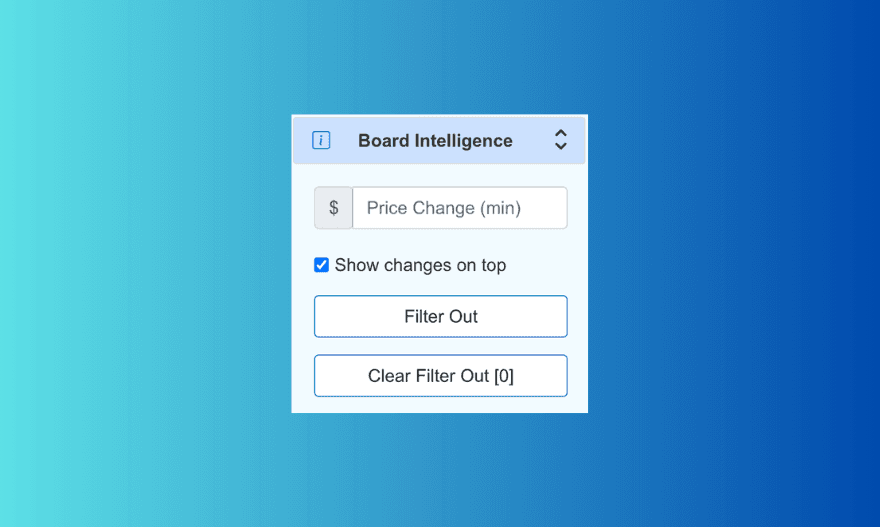
3️⃣ Filter out - This option allows users to eliminate loads from their search results that they don't want to see again in the current session, even if the price of the load increases by the amount specified in Price Change (min). This feature can be useful in a variety of trucking scenarios where certain loads are undesirable for reasons such as location, equipment type, or delivery time. If this option is activated, users will see a "filter out" button next to each load. It is important to note that the feature is automatically enabled for each load. Clicking the "filter out" button places the load in a blacklist, which can be later cleared using the "clear filter out" option.

4️⃣ Clear filter out - Allows users to clear any previously blacklisted loads that have been chosen while using filter out option, giving users a fresh start in their load search. Alternatively, beginning a new search session also clears the blacklist, effectively reintroducing all previously excluded loads as if they were new. It's important to note that when users select the "clear filter out" option, all loads previously filtered out will reappear in the search, making them appear as new.

5️⃣ Display shipper accounts - This feature provides comprehensive details about the shipper and the type of load, which are crucial for making quick and informed decisions. Regularly, Amazon does not specify this information on their end, which can make it challenging for carriers to determine if a certain load is worth taking. This detailed information allows carriers to quickly assess whether a load is worth it based on the shipper and load type, significantly improving their decision-making process.

👩🎨 Conditional color palette 👨🎨
The analytical feature uses different colors to represent different statuses of loads on the load board.
🟩 Green color - Indicates when a new load matches your specified criteria on the load board.

🟥 Red color - Used to indicate loads that have already been booked by competitors, allowing you to easily identify which loads are no longer available.

🟧 Orange color - Signifies a change in either the delivery time or the price of the load.

By recognising different colors, members can quickly identify and track the status of loads on the load board.
📟 Load activity monitor 📟
Upon activating the feature, a compact dashboard appears, tracking load activity based on user-defined preferences. This dashboard provides a comprehensive overview of load dynamics with the following key indicators:
1️⃣ New loads - Counts the new loads that were added to the load board since the user started the search.
2️⃣ Missed loads - Counts the loads have been booked by someone else and are no longer available.
3️⃣ Price change - Tracks the number of times the price of trips has been altered during the active session.
4️⃣ Loads missed during refresh - Identifies loads that appeared and disappeared between refresh cycles. Consider these as "Missed loads".
It's important to note that once you press "stop" and then "start" again, the count for new loads, missed loads, price changes, and loads missed during refresh will reset to 0. This ensures a fresh start for each session, allowing you to track load activities accurately from the moment you initiate a new search.
🔎 Market analysis with Non-stop load search 🔎
Using the "Non-stop load search" tool for market analysis is a powerful strategy to understand a region's dynamics. Here's my method: I activate the tool on a separate IP and let it run for several days. This setup allows me to track the number of loads without the need to book, giving me insights into market activity based on the number of new loads detected. This analytical approach is valuable for anyone aiming to stay ahead in the competitive market by being informed about load volumes, an aspect not directly shown by Amazon. It enables data-driven decision-making, helping to focus efforts on the most strategic locations.
🛑 Limitations 🛑
Like any tool, the following feature does have some limitations to consider.
1️⃣ For example, while the tool can help you stay on top of changes in load prices, it doesn't guarantee that you'll always be able to book the loads you want. Your competitors can book the loads ahead of you if you do not take quick decisions. The loads that are already booked by somebody else will be highlighted in red.
2️⃣ If you press “Stop” and try to book a load from the list of available loads you could potentially see an error message. This happens because the load that you are trying to book could potentially be changed or booked. To see an updated version of the list with updated links for booking you will need to press “Start” again.
3️⃣ Additionally, the filtering and blacklisting options may not be as effective if you're dealing with a high volume of loads or if your criteria for load selection are very wide. I highly recommend using a more precise search to eliminate constant notifications that could be irritating.
4️⃣ It is strictly an analytical tool and does not offer any automatic booking features, so you'll still need to manually book your loads. The fastest option would be to use a one-click book that skips a confirmation pop-up window.
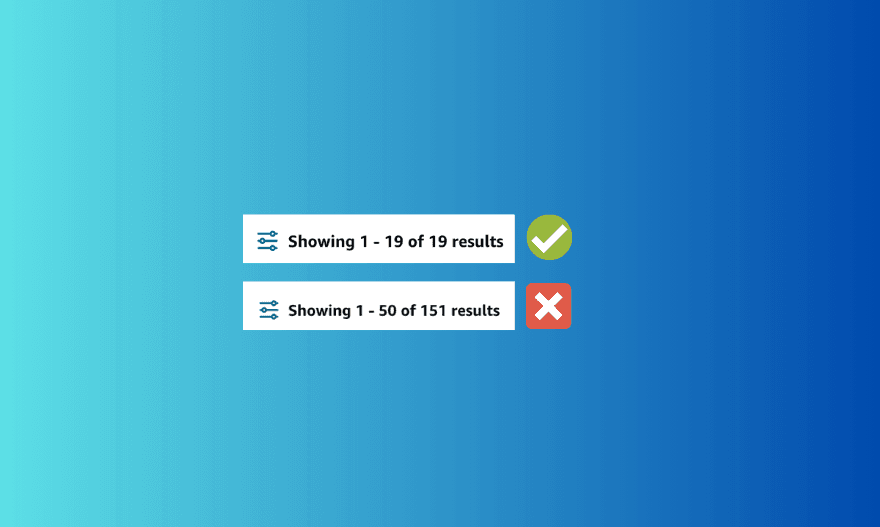
5️⃣ One notable limitation of the "Non-stop load search" feature occurs when users set a broad search criteria and the results are >50 loads. If the search is too wide, price changes and new load additions might occur on pages beyond the first, which means notifications will still alert you, but you might not see or act on these loads. We recommend narrowing your search to ensure the total number of loads stays below 50, keeping all relevant results on the first page. It's unlikely that all loads beyond this number are beneficial, many might not meet your specific needs. They will reappear in your narrowed search criteria anyway if they meet your criteria.
Conclusion
In conclusion "Non stop load search" can be particularly useful in a number of scenarios. For example, if you're a busy trucking professional who doesn't have the time to constantly refresh the load board, this feature can do it for you automatically. This can save you time and allow you to focus on other important aspects of your business. Additionally, if you're looking to be more competitive in the trucking market, it can give you an edge by notifying you of changes in load prices faster than the regular Amazon Refresh feature.